How do I add players?
- Players are added by going into the MAKE PICKS option.
- To add players, go into "Make Picks", and it will ask for the userid.
- To initially get into the system, the player uses the INITIAL password that you have set up for your football pool. (You can modify this in "Modify Football Pool").
- If they are new, they just "make up" a user id. Then they give the "initial password" (that you have set up). (NOT the game-runner password, but the "initial" password). It will then ask them to set up their own personal passord.
- If you want to add players yourself, just go to "make picks" and sign in as them. Then, let them know the password you chose.
How do I do a COLLEGE-ONLY pool?
- Note: in college pools, you have to put in your own games and scores. We only do that for the NFL games currently.
- EXCEPT, you can download college games from Sheridan's odds, and you can also "pull" games that other game runners have entered
- But you are basically still in charge of making sure the spreads and scores are correct
- In "Modify Pool", go to "advanced options" and uncheck the "use existing NFL games" box.
- Next, go to the "Game Runner Menu" and select "Add Extra Games". This is how you put in the college games you want to use for the week.
- Make sure your game numbers are in order (1, 2, 3, 4... 16, 17, etc).
- After the pool is closed (use "Close Pool" option, or auto-close), you go to "Modify Extra Games" to put in the scores.
- Then go to "Calculate Winners" to update your overall (year-to-date) stats.
How do I do a "roll-your-own" pool?
- A roll-your-own pool means you get to pick and choose your own mix of NFL and/or college games, and have your own point spreads.
- This is an "advanced" feature so don't try it unless you do some experimentation and sure you are comfortable with it
- To do the roll-your-own, set the "use existing NFL games?" option to NO on the advanced options of the pool setup screen
- You will then do a "pull games" to pull the NFL games you want
- You can do an "add extra games" to add any specific college games you want
- You can then do a "modify extra games" to modify the point spreads to your liking
How do I do a "roll-your-own" pool?
How do I change a players picks?
One way you can change a players picks by signing in as them and making the change. To find the players password, use the "update players" program on the game-runner menu (in "list" mode). A much easier way is to just login as the player and user the game runner password to make his picks. So, if you use the game runner password, you still make the picks for that player, but you can make picks even if the game has started.
When are point spreads updated?
No changes will be made to the spreads after that unless there is some kind of major error in which the spreads didn't get updated correctly, in which case the spreads might be updated late, but an announcement would be made on that.
To be safe, tell your users to check the spreads as of Wednesday afternoon. That way there is no possibility of someone complaining that the spreads were changed after they made picks. It's the players responsibility to check his picks as of Wednesday afternoon.
If you have a personal page, you can update your own point spreads by using the "Override Point Spreads, Override Tie Breaker, or Delete Certain Games" option. You have this ability because with the personal page, your system is in it's own database, so changing your spreads doesn't affect anyone else.
If you are in the "communal" system, you either have to live with the spreads as of Tuesday 9PM, or you can do a "roll-your-own" pool in which you put in your own games/spreads: in that case you are in total control of when spreads are updated.
How do I run an NFL SURVIVOR Pool?
A survivor pool is one in which people are ELIMINATED after missing, usually, just one pick. This is also sometimes called a "last man standing pool" or a "suicide pool". So a normal scenario would be something like this: everyone picks one team each week, but cannot re-use that team ever again. As soon as they miss one, they're out. The game goes on until there's just one person left. He is the survivor, so he wins! To set this up do the following:
- Set up your new football pool ("Add Football Pool")
- Go to SURVIVOR POOL OPTIONS from the main menu (bottom button on left)
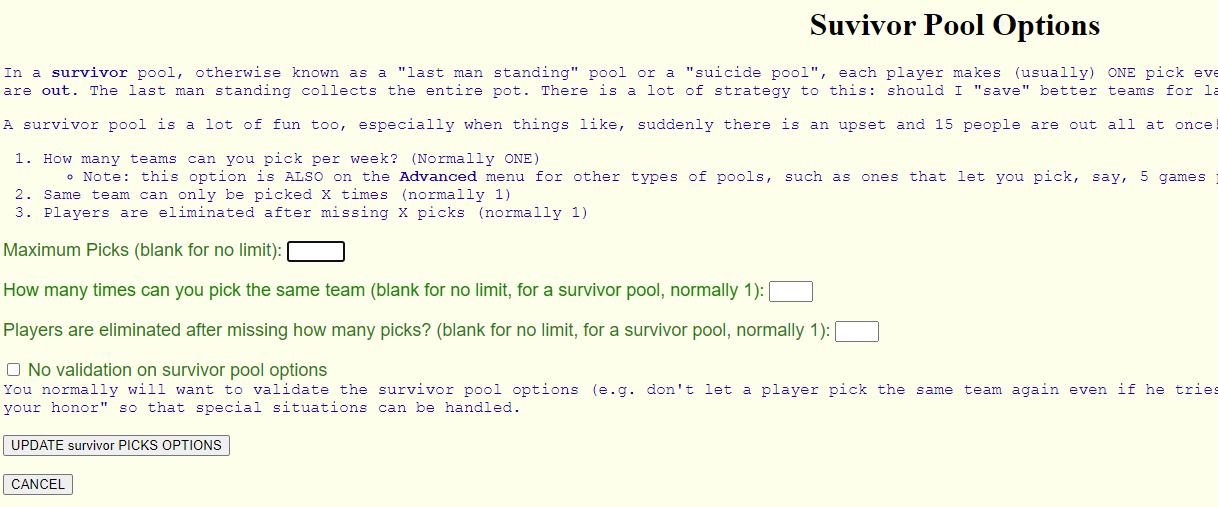
- Set MAXIMUM PICKS to 1
- Set Same team can only be picked ___ times to 1: so, they can only pick, say, New England ONCE
- Set Players are eliminated after missing ___ picks to 1: so, if they miss ONE, they are OUT
We also now have the Survivor pool report, which is cool because everyone has a line on the report, and you can see what team they picked every week, and if their line suddenly stops with a big red box, you know they were eliminated!
Again, follow these steps:
Go to Game Runner menu --> Modify Football pool --> Survivor Pool Options
It's at the bottom right of the menu:
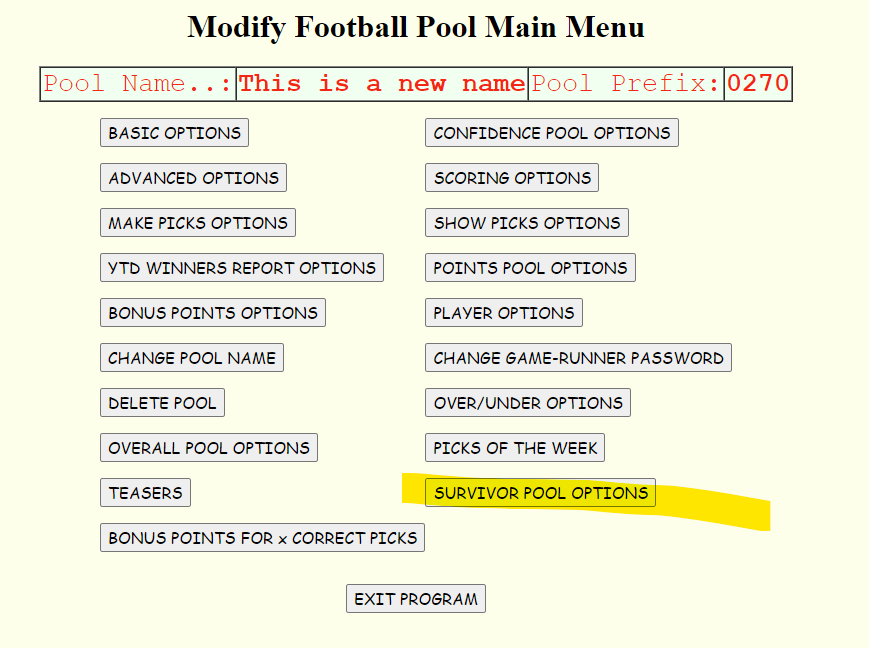
Then just fill in the screen. Normally Maximum picks = 1, How many times pick same team = 1, players are eliminated after how many wrong picks = 1:
I'm not good at computers. Can you tell me step-by-step how to set up a new pool?
- Go to http://www.castle64.com
- Click on the "Setup New Football Pool" menu option
- Enter your player password. This is the the password new players will use to initially get into the pool. For example, "football".
- Enter your game runner password. This is the password that you will use to do game runner functions such as modifying player scores, opening/closing the pool, etc.
- Enter your email address.
- Check the the "use point spreads?" box if you want to use point spreads.
- Enter a page name for your personal page. For example, if your pool is "Joe's Tool and Die Pool", the page could be "joes_tool.htm".
- Hit the "Create new football pool" button
What does "n/a" and "c/s" mean?
"n/a" means "not available": the player didn't make his picks!
"c/s" means "can't show": the pool is still open so you can't see the other guy's picks! (note: you can allow people to see other players picks before the pool is closed using configuration options)
How do I DELETE a player?
On your game runner menu, go to "Update Players". In that program, there is an option to delete the players. So, in our example pool, you would do this:
- Go to http://www.castle64.com/tigertown.htm
- Go to "Game Runner Menu" link
- Click on the "Update Players" link
I deleted a player by accident. How do I put him back in?
You add in a deleted player the same way new players are added: you go into "Make Picks" and sign in as him. Note: if you delete a player, his picks are NOT deleted! So by signing in as him, it will re-create his player entry, and his picks will magically re-appear...
NOTE: if you delete a player, and add him back in with a DIFFERENT NAME, the picks will NOT reappear! Thats because, the picks are still sitting there in the database, but they are under the old name. So if you change the player name, those picks won't reappear. (Having a "change player name" option is near the top of the to-do list!)
How do I put picks in for a player after the game has started or the pool is closed
You can put in picks for any player by going to "Make Picks" on your personal page, then use the GAME RUNNER password to go into make picks. Not the INITIAL password, but the GAME RUNNER password, the same one you use to update the stats. In this mode, you can "Make Picks" for the player in any week, even if the pool is closed or the game has already started. There will be a big warning on the screen saying you are overriding any closes!
One of my players forgot his password. How do I find his password?
To find a player's password, go to the Game Runner menu, and run "Update Players". This program will show you all the player passwords. You can also CHANGE passwords in here if you need to!
How do I update my overall stats?
To update your overall stats, use the "Calculate Winners" program on your game runner menu. There is a checkbox to update weekly stats or overall stats. Run this only ONCE per week for the overall stats. In case you accidently run it more than once in a week, you can use Reset Pool to reset the overall stats back to zero, then re-run "Calculate Winners" for each week. Note: Reset Pool only updates OVERALL STATS, it does NOT delete any player picks!
Once you have updated your overall stats, then the Overall Winners report on your player menu will show the year-to-date scores of everyone. Also, the "tie-breaker variance" report shows you another version of overall stats.
I'm starting late: how do I put in the scores for the prior weeks?
There are 2 ways to put in your prior week scores: - 1. Use "update players" to put in the TOTAL scores for the prior weeks. The only drawback to this is, if ever needed to RESET and RECALC your stats, you would have to put the adjustments back in also.
- 2. Use "Make Picks". You can put in player picks for previously-played games by using the GAME RUNNER password instead of the player password in "Make Picks". Of course, the only drawback to this is that it would be a lot of typing to get all the picks in.
My OVERALL WINNERS report looks wrong. How do I fix it?
Usually the overall winners report gets messed up if you run the "calculate winners" program twice
by accident, thus doubling up one week in the overall stats. Or sometimes, maybe you run "calculate winners"
before the Monday night game has finished.
There is an EASY way to fix this! Just use "Reset Pool" to reset your overall stats to zero. Then run "Calculate Winners" for each week. That will get everything back to normal. Remember, Reset Pool does not delete any picks! It only resets the overall stats to zero. So, lets say you accidently ran the calc for week 3 twice. Here's what you would do:
- Run Reset Pool
- Recalc week 1
- Recalc week 2
- Recalc week 3
I think the game-runner is cheating. How can I make sure he's not?
Our online office pool has a big advantage over the normal office pool where you fill out your pick
sheets and turn them in to the pool runner. In the normal paper-based office pool, you have to trust your
game runner. You turn in your sheets to him. If he's playing, there's no way you can know whether he's changing
his picks after the fact! The only way you could be sure would be to get a photo-copy of his pick sheet
on Friday.
In our online pool, this is not a problem! How can you make sure NOONE is cheating? Simply do a "Show Picks" right after the cutoff deadline. Save that to your hard drive: (In internet explorer, do a File->Save As). You now have proof of everyone's picks: you can be sure no one has changed their picks after the games have started!
We also have yet another option: the "Picks Log" program on the player menu. This will show you the Date/Time stamp of everyones picks for the week: when they were ADDED and when they were MODIFIED. In this program, however, you have to give the game-runner some leeway. For example, one of the players may have emailed his picks in, and the game-runner might not get them input into the system until later. However, the game-runner should have a good explanation of any pick changes or additions that go into the system after the deadline.
Does the web site back up my pool?
The answer to this one is a big NO. The game-runner is repsonsible for backing up up the pool.
There is a simple and easy way to back up your pool: Do a "Show Picks" right around the deadline, and save
it to your hard drive (in Internet Explorer, go to File->Save As). We have a program that can
restore your entire pool just from the "Show Picks" listings for each week. If you save your
show picks each week, you can be sure the pool can be recovered in case the data gets corrupted or wiped
out on the server.
We've had problems in the past where picks have been lost. For example, one time the server ran out of disk space. My web hosting account was supposed to have 250 meg of disk space but in reality it only had 150 meg (THEIR mistake!). When we hit the incorrect 150 meg limit, everyone's data was corrupted, some picks were lost, it was a big mess.
The solution is for each game runner to do a Show Picks each week and save it. I've written a program that can re-build your entire pool (players, picks, etc) just from the Show Picks report. You can also use this Show Picks backup if anyone is questioning whether someone had changed their picks after the deadline: the Show Picks has a date/time stamp, you can print it or email it to the person with the questions.
My pool is picking every game & 3 best bets. How do I set up best bets?
Best bests is a "confidence pool". Go to "confidence pool" options in "modify football pool" and set it up
as "confidence pool and ADD the confidence points". Then set it up as 1 - 3
(1 confidence point, can assign to 3 games).
How do I set an option to have our pool close 1 hour before the start of the first game of the week?
Go to "Modify Football Pool", and go to "DeadLine Day", and put in SU, and "Deadline Time", put in 12PM.
You don't need to worry about Thursday / Saturday games because they get automatically greyed-out once they
start. If you DO want to block picks before the first game if there's a Thursday / Saturday game, you'll
need to change your Deadline day and time.
I can't make picks! My Pool is closed!!
Follow these steps.
- Go to your personal page. For our example pool, that would be http://www.castle64.com/example.htm
- Click "Game Runner Menu"
- Go to Open/Close Pool
- If you want to permanantly open the pool, Select "Open Pool and LEAVE OPEN" and hit the "Open / Close Pool" button
- This means that the pool will stay open even if you hit the deadline later.
- You must MANUALLY close the pool if you want the pool to be closed when you do this
- If you want to temporarily open the pool, and then close it again automatically when it hits the deadline, select "OPEN the pool but AUTO-CLOSE when deadline is reached"
NOTE: if you manually open or close the pool, that overrides your deadline! So you'll need to manually close it as well!
We are running a confidence pool and players get a point for each correct pick as well as the confidence points. I want them to just get the confidence points.
Go to "modify football pool", then "Confidence Pool Options". Change it from "confidence pool and ADD the confidence points" to "confidence pool confidence points only".
My Overall Winners report show's all zeros for my players. How come?
You probably just need to run the "Calculate Winners" program from your game runner menu!
My Overall Winners report doesn't match what I think the total score should be. What should I do?
What you can do is what we call "reset and recalc". You run the RESET POOL program, to reset
your overall stats to ZERO for all players. (Don't worry, the PICKS are still there. This just resets
the OVERALL stats). Then we RECALCULATE each week using the CALCULATE WINNERS program.
For example, lets say you think JOEDOG should have 55 points, but the system shows you
46 points. Open up 2 browsers. Put one browser in the "Calculate Winners" program on your
game runner menu, and put one browser on the "Overall Winners" program.
Now recalulate each week, and make sure each week the total comes to what you think it
should be by looking at Overall Winners. For example:
- Week 1 = 7 points total = 7 points
- Week 1 = 6 points total = 13 points
- Week 1 = 6 points total = 19 points
- Week 1 = 4 points total = 23 points
- Week 1 = 13 points total = 36 points
- Week 1 = 10 points total = 46 points
- Total overall score = 46
I ran calculate winners twice for the same week. How do I fix it?
What you can do is what we call "reset and recalc". You run the RESET POOL program, to reset your overall stats to ZERO for all players. (Don't worry, the PICKS are still there. This just resets the OVERALL stats). Then we RECALCULATE each week using the CALCULATE WINNERS program. Start with week 1.
If you do this in week 2 or 3, it's easy. If it happens near the end (say, Week 16), it's a little bit of a hassle. To make it easier, just do the Calculate Winners for week 1, then just arrow back to come back to the entry screen, change the week to week 2, and so on.
Here are a little bit more detailed instructions on the reset/recalc process: Overall Reset Instructions
I want to FORCE a player to have a certain number of points in a certain week. How do I do it?
The way to do this is to use MAKE PICKS, and sign in using the GAME RUNNER password (not the player password).
Using the Game Runner password does an override if the pool is closed or the games are already over.
You can then pick the games you want for him. For example, suppose your player name is BROWN and it is
Week 1 of NFL, and you want him to have 15 points, and your pool is tigertown.htm. Here's what you do:
- Go to http://www.castle64.com/tigertown.htm (insert your pool here)
- Hit Make Picks
- Put in BROWN, the game runner password of JOE, and select week 1
- On another browser session, look at SHOW PICKS and look at the winning teams
- Select the first 15 winning teams. Leave the others blank.
- Hit "Make Picks"
- Look at SHOW PICKS again, and you'll see that Joe now has 15 points for week 1.
I do SHOW PICKS and print it, and it doesn't fit on my printer. What do I do?
The first thing is to set the fonts and stuff the way it tells you:
- Font size 1 (the smallest)
- Style arial
- Put point spreads on 2cd line (this makes it less wide)
- All games in lower case (lower case letters take up less room)
- Decrease the text sizes in your browser
- If you are using Internet Explorer, go to View->Decrease Text Size
- Try printing in Landspape
How can I copy the Show Picks report into Excel?
The best way to copy the Show Picks report into Excel is to use the Windows copy/paste functions.
- Go to your home page and do Show Picks
- Do a CTRL-A (highlight all)
- Open a blank Excel spreadsheet and do a CTRL-V (paste)
- You now have a formatted Excel spreadsheet
- Go to your home page and do Show Picks
- Do a CTRL-A (highlight all)
- Open a blank Excel spreadsheet
- Go to Edit -> Paste Special
- Select Text and click on OK
- You now have all the data in Excel, and you can do whatever formatting you would like to do on the columns
What about Thursday and Saturday games and my deadline?
You do not need to worry about Thursday and Saturday games! The reason is that
all games are automatically GREYED-OUT 5 minutes before game time. Therefore, if you have
a Sunday noon deadline, you can just leave it alone. No one can pick the Thursday or Saturday games
after they start, so you don't need to worry about those.
Also, SHOW PICKS will SHOW any games that have already started! So everyone can see what everyone else picked the minute the games start.
In fact, since games are automatically greyed-out once they start, you ALMOST don't even need a deadline. But actually you still need one (as late as possible) for reasons given below.
Some pool runners prefer to TAKE OUT the Thursday games completely: because all their co-workers are too busy or whatever to get their picks in before Thursday. If you want to do that, it's easy: go to your Game Runner Menu and hit the "Override Point Spreads or Delete Certain Games" link. There, you can take OUT the Thursday (and/or Saturday) games. They won't show up on Show Picks or on Make Picks: it will be as if they never existed...
Note: You still need a deadline!. Just make it as late as possible. I prefer Sunday at 1:00 PM, if the players can't make it by then, they are out of luck. BUT, if you want to be especially accommodating, you can even make the deadline for Monday right before the Monday night game. A tuesday deadline will NOT work, because it's going to think it's the NEXT Tuesday. You need a deadline because certain reports won't display anything until the deadline is hit. The main one, Show Picks, will work without a deadline, but the Each Pick report insists on waiting until the deadline is hit (because, with Each Pick, you'd be able to tell which games the other people picked, even though it has c/s. That could be used to your advantage).
I can't see other players picks. Why not?
Normally, the game runner will set up the pool so that you can not
see other players picks until after the pool is closed.
This is an OPTION: in "Modify Football Pool", in "Basic Options", there is an option "When should players be allowed to show other players pics". On this radio button, you can choose "Any Time", or the default "Only when pool is closed". Usually game runners do NOT want anyone to see other peoples picks until AFTER the pool is closed. Personally, I think it's more fun to add a little strategy and let people look at other peoples picks and constantly change things back and forth up until game time! But that's not the norm...!
How do I add an OVER/UNDER pick to my pool?
On your game runner menu, there is an option "Add Over/Under Pick". Just add the over/under pick for any
games you want in the selected week!
What if I want to run my pool through the playoffs?
If you want to run your pool through the playoffs, you have 3 options:
1. You can have the playoffs be part of your regular pool, and just keep going along through the playoffs. Overall scores will continue to accumulate. This doesn't cost you anything, you can just keep using your pool for the year.
2. You can RESET your pool at the end of the regular season and just keep playing in the same pool. So you essentially have 2 pools, but you are using the same pool page. This also doesn't cost you anything.
3. You can set up a SEPARATE pool for the playoffs, with it's own web page. You can get these for half price of your regular pool.
Can you give me step-by-step instructions for my players to get signed in?
You can give the following instructions to your players in an email. Where it says "[INSERT], replace with
your specific pool information:
- Go to http://www.castle64.com/[INSERT YOUR PERSONAL PAGE NAME HERE]
- Click on "make picks"
- Choose a week to make picks: preseason is fine to start with, these will be deleted later
- Make up a player name for yourself, and enter it in "Your player name"
- Enter [INSERT YOUR POOL INITIAL PASSWORD HERE] for the password
- Hit "enter your picks"
- It will say "enter your new password". make up a password and enter it
- Type your new password again to validate
- Click on "continue"
- You now have created your new user and can make picks
This site is a little different from other sites. There is no "create account" or "log in" page. If you don't have an account yet, you just hit "Make Picks" and use the initial password and your account will be created for you.
My question is still not answered. What do I do now?
If you have read the faq carefully and still can't find the answer to your question, I will be happy to answer it by email.
Just email me at craigh01@gmail.com
Try to be as specific as possible. For example, sending me an email saying "One of my players claims he picked the Jets but the report shows him picking Cleveland". Telling me which player would be KEY here for me to answer the question.
How does the tie-breaker work? Closest, or closest without going over?
CLOSEST! So, if the score is 42, and Joe had 43, and Sally had 40, then Joe wins because
he was only 1 point away.
This COULD be changed as a custom programming request, but for now everyone seems to
be able to live with this rule.
How do I change my pool name?
You can change your pool name every year. You don't need to set up a new pool (although you can if you want!). To change your pool name, go to Game Runner Menu --> Modify Football Pool --> Main Menu --> Change pool name.
It's that easy!
How do I change my page name?
You can also change your home page name every year. The page is the LINK that your players will use to get to your page. So, say you've got the year in the page, every year you can change the page name. Say it's http://www.castle64.com/tigertown.htm. Here's what you would do:
- Go to your old page (tigertown.htm)
- Click the Game Runner link
- Click Modify Football Pool (the very top option)
- Sign in with your game runner password
- On the "basic options" screen is your home page name. Just change the page name to, say, "tigertown2014.htm".
- Click the "Modify Basic Options" button
- Now, it will give you a link to the new page
- NOTE: you and your players may need to REFRESH THEIR BROWSER to see the new page (ctrl-F5 or just F5 is one way to do it)
It's that easy!
How do I change my player password or my game runner password?
The player initial password is easy to change. Here are the steps:
- Go to your personal page, e.g. http://www.castle64.com/tigertown.htm
- Click the link for the Game Runner Menu
- Modify football pool
- There on the "Modify Basic Options" screen is the player password. Make your changes and hit "MODIFY BASIC OPTIONS"
Changing the game runner password is a bit harder, for that, it's Game Runner Menu --> Modify Football Pool --> Main Menu --> Change game runner password. You have to type it twice when changing it, because if you forget, there's no way to retreive it without sending me an email, which might not get answered immediately!
I have the 50 players pool. How to I order more players?
The most cost-efficient way to order your pool is in blocks of players, for example, the early-bird special of 21 - 50 players for $17.47. But, what if I run over and get, say, 52 players?
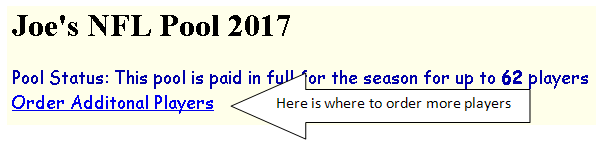
If that happens, it's easy, just go to your game runner menu, and at the very top of the page it will tell you how many players you are paid up for, and gives you a link to Order Additional Players.
You can get additional players for just 50 cents per player (but due to my transaction costs, the minimum order is $3, or 6 players).
Here is an example picture to show where you see the "order more players" link on your game runner menu:
I want to add a Word Doc with special instructions to the top of my page. How do I do it?
To add a word doc to the top of your page (you can also add an excel file, a video, a picture, a power point presentation,
anything!), go to your Game Runner Menu, then hit the "Edit your Personal Page / Upload a file to Your Directory"
link.
Next you want to hit the "upload a file to your directory" button. There you can upload any files you want to your personal directory. So upload your word doc file here. Let's say it's "rules.doc". Just hit the Browse button, find your "rules.doc" file, then hit "Upload File to your website". Note: make sure your file name doesn't have spaces in it! So don't try to upload "My Pool Rules.doc", make it "MyPoolRules.doc" or "My_Pool_Rules.doc" or something like that.
Next you have to insert your file into your personal page. It will go into the player menu, either at the top or at the bottom of your page. You can insert any special instructions there. You can just put in straight text, and you can also put a file download attachment.
To put in a file attachments, you use those special indicators in the "Edit your personal page" link. It's all explained on that page, but it works like this: If you want your "rules.doc" at the top, you go to "Edit the top part of your personal page" button, and there you can add some text, like, "Instructions for the pool:" and you insert your file with special indicators like this: " ~~file: rules.doc : Pool Instructions~~"
So it's 2 tildes, then "file: " then the file name, then " : ", then the file description, then 2 more tildes...
You can put it at the top or the bottom. The middle part is always the normal player menu.
Sounds a little complicated but it's not that hard once you get used to it. Try it! You can't hurt anything...
Does RESET POOL delete any picks?
Nope, Reset Pool does not delete any picks. All it does is clear the overall stats. So you can never hurt anything by doing a Reset Pool!
Normally you won't need to do a reset pool. The time you do a reset pool would be, if, for example, you accidently ran "calculate winners" twice in one week. Or, maybe you ran "calculate winners" but forgot about the Monday Night game had not yet been played.
The other time you might run Reset Pool is if you don't agree with the overall scores. So you can't figure out why Joe has a "total right" of 17 when you think it should be 18. If you reset the pool, then start with recalculating week 1, you can check, one week at a time, where the score went off from what you think it should be.
Actually it wasn't 100% true that you can't hurt anything with Reset Pool. The one thing you could hurt would be if you had made manual adjustments to the overall stats using Update Players. If you did Reset Pool / Recalc, then those manual adjustments would be lost, and you'd have to apply them again. That would be the only thing to watch out for.
Instructions for new and returning users to sign up?
- NEW USERS
- You will be given the link to the pool main page by your game runner. Example: http://www.castle64.com/tigertown.htm (your link will be different: ask your game runner if you don't have it)
- Click on Make Picks
- Choose your week to make picks in: for testing, you can use a pre-season week
- Make up a player name for yourself. It can be your real name or an alias, like, "cooldude" or something...
- Enter the initial password given to you by your game runner. If you don't have it, ask your game runner.
- Click ENTER YOUR PICKS
- Now it will ask you for your NEW password. (And possibly some other information, depending on what your game runner wants). Fill that in and click Continue
- That's it! You are all set up! From now on, use the new password you entered in the above step.
- EXISTING USERS
- You will be given the link to the pool main page by your game runner. Example: http://www.castle64.com/tigertown.htm (your link will be different: ask your game runner if you don't have it)
- Click on Make Picks
- Choose your week to make picks in: for testing, you can use a pre-season week
- Enter the player name and password you used last year
- If you don't remember your password, you can ask your game runner
- Or, you can just create a new user (if it's OK with your game runner)
- That's all there is to it!
You can also watch a video on how to use the site here: castle64.com video
The player instructions (as opposed to the game runner part) is about half-way through the video
How can I remove a game from my pool?
To remove a game, go to your Game Runner Menu and hit the "Override Point Spreads or Delete Certain Games" link.
Usually, people want to remove a Thursday game. In "Override Point Spreads or Delete Certain Games", you can can take OUT the Thursday (or whatever) game(s). They won't show up on Show Picks or on Make Picks: it will be as if they never existed...
How do I see my player info (real name, email address, etc.)?
Assuming you are tracking player information, you can see it / update it by going to Game Runner Menu --> Update Player Extra Information.
That's all there is to it!